> ## Documentation Index
> Fetch the complete documentation index at: https://developers.avacloud.io/llms.txt
> Use this file to discover all available pages before exploring further.
# Platform Webhooks
### Why Use Avalanche Platform Webhooks?
Avalanche Platform Webhooks enable developers to monitor activities on the P and X chains with the following advantages:
* **Real-time notifications:** Receive updates as events occur.
* **Reduced overhead:** Eliminate the need for constant blockchain polling.
* **Customizable monitoring:** Subscribe to specific events and apply filters tailored to your needs.
* **Support for multiple sub-events:** Track related activities within a single webhook subscription.
These features make webhooks ideal for building responsive applications, such as wallet trackers, staking monitors, or validator management tools.
## Understanding webhook event types
Avalanche Platform Webhooks support two main event types, each with specific sub-events you can subscribe to:
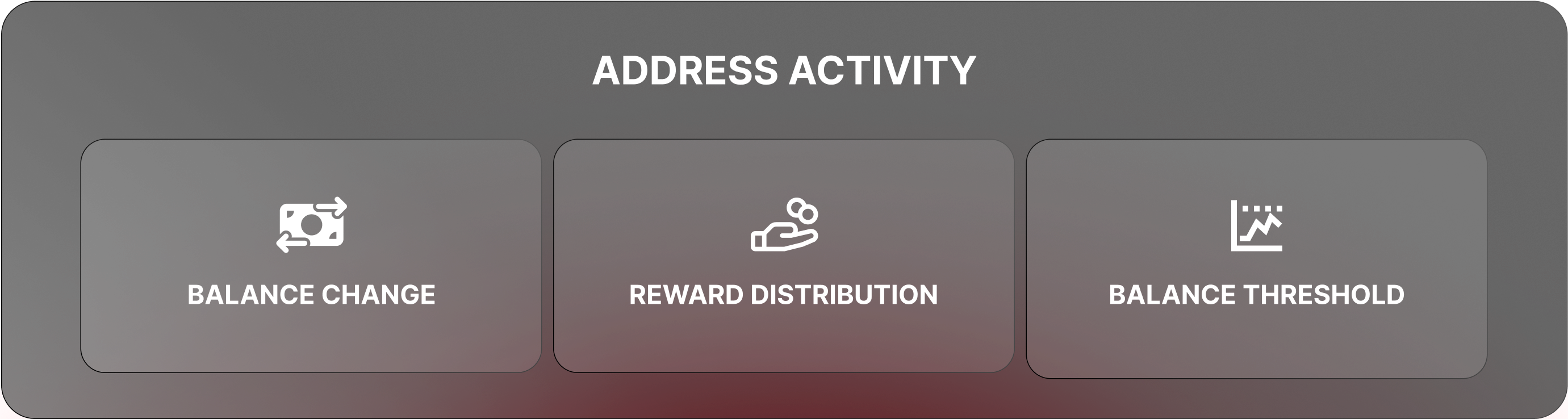
* **Primary Network Address activity**: Tracks balance-related changes and reward distributions for P/X chain addresses.
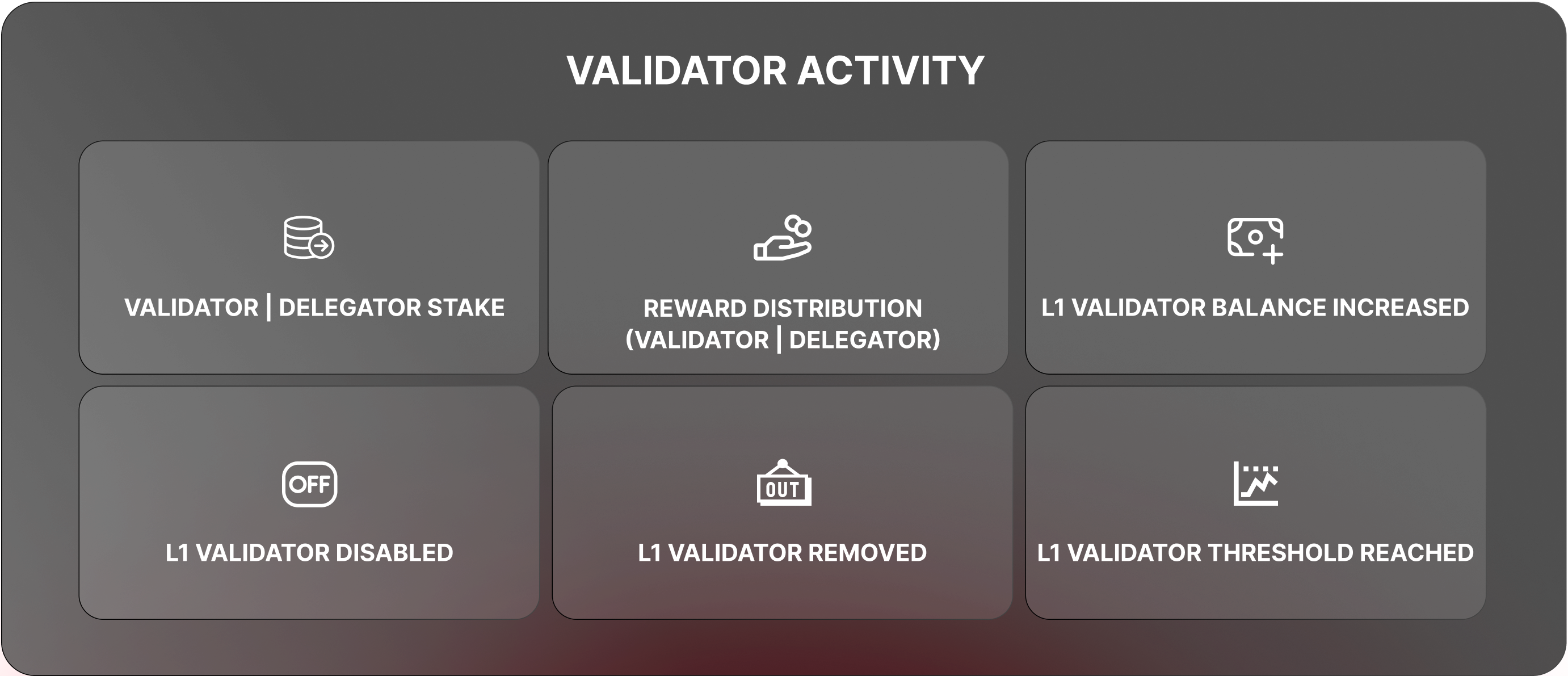
 * **Validator activity**: Monitors validator registration, balance updates, and reward distributions.
 ***
## Setting Up a Webhook
To get started, you'll use the **Data API** to create your webhook. Authentication is required, so you'll need an API key.
### Create Your Request
Here’s how to set up a webhook using curl:
```bash theme={null}
curl -X 'POST' \
'https://glacier-api.avax.network/v1/webhooks' \
-H 'accept: application/json' \
-H 'x-glacier-api-key: YOUR_API_KEY' \
-H 'Content-Type: application/json' \
-d 'YOUR_JSON_PAYLOAD'
```
## Creating a Webhook: Examples
### Example 1: Tracking Address Activity
This webhook monitors balance changes, thresholds, and rewards for a specific address on the P-Chain.
```json theme={null}
{
"url": "https://your-webhook-endpoint.com",
"chainId": "p-chain",
"eventType": "primary_network_address_activity",
"network": "fuji",
"name": "Address Activity Monitor",
"description": "Tracks activity for my P-Chain address.",
"metadata": {
"keyType": "addresses",
"keys": ["fuji1aerex08szh4ge5g7sggsddkpdhyzhja9f6v7y0"],
"subEvents": {
"addressActivitySubEvents": [
"balance_change",
"balance_threshold",
"reward_distribution"
]
},
"balanceThresholdFilter": {
"balanceType": "unlockedUnstaked",
"balanceThreshold": "5500000000"
}
}
}
```
Key Fields Explained
* `url`: Where notifications will be sent.
* `chainId`: The chain to monitor ("p-chain" or "x-chain").
* `eventType`: Set to "platform\_address\_activity".
* `network`: "fuji" (testnet) or "mainnet".
* `metadata.keys`: The address(es) you’re tracking.
* `metadata.subEvents`: The sub-events you want to monitor.
* `metadata.balanceThresholdFilter`: Triggers BALANCE\_THRESHOLD if the "unlockedUnstaked" balance falls below 5.5 AVAX (5,500,000,000 nAVAX).
### Example 2: Tracking Validator Activity
This webhook monitors a validator’s NodeID for various events.
```json theme={null}
{
"url": "https://your-webhook-endpoint.com",
"eventType": "validator_activity",
"network": "fuji",
"name": "Validator Monitor",
"description": "Tracks my validator’s activity.",
"metadata": {
"keyType": "nodeId",
"keys": ["NodeID-H8AkDZHd6Jczcc1v8aVDLb5haQYPkGxqt"],
"subEvents": {
"validatorActivitySubEvents": [
"validator_stake",
"delegator_stake",
"reward_distribution",
"l1_validator_balance_increased",
"l1_validator_balance_threshold",
"l1_validator_disabled",
"l1_validator_removed"
]
},
"subnetIds": ["11111111111111111111111111111111LpoYY"],
"l1ValidatorFeeBalanceThreshold": "5000000000"
}
}
```
Key Fields Explained
* `metadata.keyType`: Set to `nodeId` or `subnetId`.
* `metadata.keys`: The `NodeID` to track (only one key allowed).
* `metadata.subnetIds`: Filters events to a specific subnet (optional).
* `metadata.l1ValidatorFeeBalanceThreshold`: Triggers if the L1 validator’s balance drops below 5 AVAX.
### Example 3: Monitor all the validators in the primary network
To monitor all validators on the Primary Network:
```json theme={null}
{
"url": "https://your-webhook-endpoint.com",
"eventType": "validator_activity",
"network": "mainnet",
"name": "Primary Network Validators",
"description": "Tracks validator registrations and rewards.",
"metadata": {
"keyType": "subnetId",
"keys": ["11111111111111111111111111111111LpoYY"],
"subEvents": {
"validatorActivitySubEvents": [
"validator_stake",
"delegator_stake",
"reward_distribution"
]
}
}
}
```
***
## Setting Up a Webhook
To get started, you'll use the **Data API** to create your webhook. Authentication is required, so you'll need an API key.
### Create Your Request
Here’s how to set up a webhook using curl:
```bash theme={null}
curl -X 'POST' \
'https://glacier-api.avax.network/v1/webhooks' \
-H 'accept: application/json' \
-H 'x-glacier-api-key: YOUR_API_KEY' \
-H 'Content-Type: application/json' \
-d 'YOUR_JSON_PAYLOAD'
```
## Creating a Webhook: Examples
### Example 1: Tracking Address Activity
This webhook monitors balance changes, thresholds, and rewards for a specific address on the P-Chain.
```json theme={null}
{
"url": "https://your-webhook-endpoint.com",
"chainId": "p-chain",
"eventType": "primary_network_address_activity",
"network": "fuji",
"name": "Address Activity Monitor",
"description": "Tracks activity for my P-Chain address.",
"metadata": {
"keyType": "addresses",
"keys": ["fuji1aerex08szh4ge5g7sggsddkpdhyzhja9f6v7y0"],
"subEvents": {
"addressActivitySubEvents": [
"balance_change",
"balance_threshold",
"reward_distribution"
]
},
"balanceThresholdFilter": {
"balanceType": "unlockedUnstaked",
"balanceThreshold": "5500000000"
}
}
}
```
Key Fields Explained
* `url`: Where notifications will be sent.
* `chainId`: The chain to monitor ("p-chain" or "x-chain").
* `eventType`: Set to "platform\_address\_activity".
* `network`: "fuji" (testnet) or "mainnet".
* `metadata.keys`: The address(es) you’re tracking.
* `metadata.subEvents`: The sub-events you want to monitor.
* `metadata.balanceThresholdFilter`: Triggers BALANCE\_THRESHOLD if the "unlockedUnstaked" balance falls below 5.5 AVAX (5,500,000,000 nAVAX).
### Example 2: Tracking Validator Activity
This webhook monitors a validator’s NodeID for various events.
```json theme={null}
{
"url": "https://your-webhook-endpoint.com",
"eventType": "validator_activity",
"network": "fuji",
"name": "Validator Monitor",
"description": "Tracks my validator’s activity.",
"metadata": {
"keyType": "nodeId",
"keys": ["NodeID-H8AkDZHd6Jczcc1v8aVDLb5haQYPkGxqt"],
"subEvents": {
"validatorActivitySubEvents": [
"validator_stake",
"delegator_stake",
"reward_distribution",
"l1_validator_balance_increased",
"l1_validator_balance_threshold",
"l1_validator_disabled",
"l1_validator_removed"
]
},
"subnetIds": ["11111111111111111111111111111111LpoYY"],
"l1ValidatorFeeBalanceThreshold": "5000000000"
}
}
```
Key Fields Explained
* `metadata.keyType`: Set to `nodeId` or `subnetId`.
* `metadata.keys`: The `NodeID` to track (only one key allowed).
* `metadata.subnetIds`: Filters events to a specific subnet (optional).
* `metadata.l1ValidatorFeeBalanceThreshold`: Triggers if the L1 validator’s balance drops below 5 AVAX.
### Example 3: Monitor all the validators in the primary network
To monitor all validators on the Primary Network:
```json theme={null}
{
"url": "https://your-webhook-endpoint.com",
"eventType": "validator_activity",
"network": "mainnet",
"name": "Primary Network Validators",
"description": "Tracks validator registrations and rewards.",
"metadata": {
"keyType": "subnetId",
"keys": ["11111111111111111111111111111111LpoYY"],
"subEvents": {
"validatorActivitySubEvents": [
"validator_stake",
"delegator_stake",
"reward_distribution"
]
}
}
}
```